










A Ruby Reels casino login opens everything tied to your account: the AUD balance, active bonuses, Ruby Points and the settings for your limits. All it takes is the email you joined with and your password. This guide covers signing in from Australia, the very first login after registration, using a phone, keeping the account safe and what to do when access fails.
01
Ruby Reels Casino Login Australia: How It Works
Players in Australia sign in through the same panel as everyone else, and the site shows prices and balances in AUD. Here is the sequence:
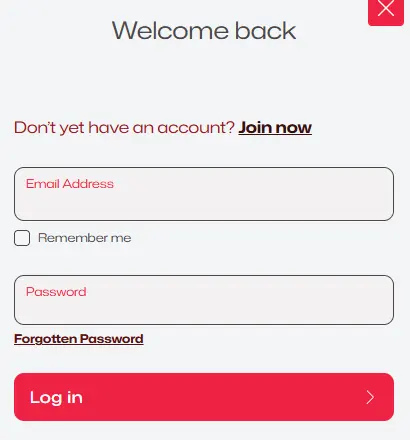
- Look for the Log In link at the top right of the page and select it.
- The "Welcome back" panel opens on the right side of the screen (on a phone it covers the full width).
- In Email Address, type the address that belongs to your account.
- In Password, enter your password exactly, with the same capital letters.
- Decide on Remember me – tick it only on a device that nobody else uses.
- Select Log in to finish.
When the details match, the panel disappears and your account name replaces the Create account button in the header. If the panel stays open with a message, read it carefully: in most cases it points to a mistyped email or password.
There is no separate site or app for Australia. One address, one account and one set of details work from Perth to Brisbane.
02
Your First Sign-In After Joining
New members create a profile with the Create account button, or with the "Join now" link inside the login panel. Once registration is complete, you can sign in at once with the email address and password you picked during sign-up. The first Ruby Reels casino login after joining works exactly like every later one – there is no activation code to type and no second form to fill in.
After that first sign-in, the header shows your balance and the account menu. From there you reach the cashier, your active bonuses, the Ruby's Rewards page with your loyalty level, and the settings. Take a moment to look around: knowing where each part sits saves time when you come back.
The first login is a good moment to set things up. Many players head straight to the cashier: a deposit of A$30 or more triggers the first part of the welcome package, a 100% match up to A$2,000 with 100 free spins. After that first deposit, seven Wheels of Fortune unlock, one per day.
It also helps to open your account settings before you play. That is where caps on deposits, losses, wagers and playing time live, along with cool-off and self-exclusion. Setting a budget now takes a minute and saves thinking about it later.
At some point, usually before a withdrawal, you may be asked to verify your identity and payment method under our KYC Policy. This is a normal check, and our support team tells you exactly what is needed.
03
Logging In on iPhone and Android
You do not need an app for a Ruby Reels login on a phone. Open the site in Safari, Chrome or any up-to-date mobile browser, select Log In, and the same panel appears, sized for the screen.

A few small habits make phone access easier. Save the site to your home screen so it opens like an app. Let the browser's password manager store your details if the phone is yours and locked with a PIN or fingerprint. On a phone you share with family, skip Remember me and sign out after each session.
If the keyboard hides the button, scroll the panel up or turn the phone to portrait. The money in your account, bonus progress and points are identical on mobile and desktop, because they belong to the account rather than the device.
04
Keeping Your Account Safe
A strong, unique password is the best protection. Use one that you do not repeat on other sites, make it long, and mix letters with numbers. Change it straight away if you think someone else may know it.
Use Remember me only on your own devices. On a public or work computer, leave it unticked and log out at the end, so the next person cannot open your account. Never share Ruby Reels casino login details with anyone – support staff never request passwords, whether over chat or by email.
Account tools can protect your budget as well as your access. After you log in, you can set daily, weekly or monthly caps on deposits, losses, wagers or session time, take a cool-off of up to 30 days, or choose self-exclusion. New restrictions apply immediately. To lift a limit, you confirm the request through a link sent to your email – an extra step that stops anyone else from removing it.
05
If You Cannot Sign In
When a Ruby Reels casino login Australia attempt fails, the reason is usually one of these:
- A typo in the email – check for a missing letter or a space at the end.
- Caps Lock – passwords are case-sensitive.
- An old saved password – delete what the browser filled in and enter it manually.
- Cookies switched off – turn them on for our address, otherwise the session cannot be stored.
If the password itself is the problem, choose the Forgotten Password link just below where you type the password, then enter your email. We send a message containing a reset link; follow it, choose a new one and log in again. No message after a few minutes? Check the spam folder before you try again.
Still locked out? Contact support on live chat, open 24/7, or write to the team by email.
06 — FAQ
Ruby Reels Casino Login FAQ
Is there an app I must install first?
No. You log in on the website in any modern browser, on a phone or a computer.
Should I tick Remember me?
Only on your own device. It keeps you signed in, so leave it off on shared or public computers.
I just registered – can I log in straight away?
Yes. Open the Log In screen and use the details from your registration.
Can I set a deposit limit after logging in?
Yes. Caps on deposits, losses, wagers and session time sit in your account settings, together with cool-off and self-exclusion.
Does one login cover pokies and the live casino?
Yes. A single account opens every part of the site – pokies, live tables, tournaments, promotions and the cashier.
Who helps if my account is locked?
Our support team on live chat, around the clock, or by email. They will never ask for your password.